Do now: Day 2 Daily exposure exercises
2) At a birthday party with candle lights only and you’re taking a picture of the cake
ISO= Shutter Speed = Aperture= Lens (Focal length)=
Did you make a new photo album for MP2? AJS11-0__ Your name MP2 also the QR code...upload it to the album and share your new album to mcsmphoto@gmail.com
***************************************************************
class work: watch this video on your phone and update slide 4 (video review).
https://youtu.be/YojL7UQTVhc (turn on transcript when watching).
slide 5: Video review- what is aperture? what unit is the aperture set in? effect of aperture... + diagram
https://oberphotographytips.files.wordpress.com/2013/04/aperture-example1.jpg
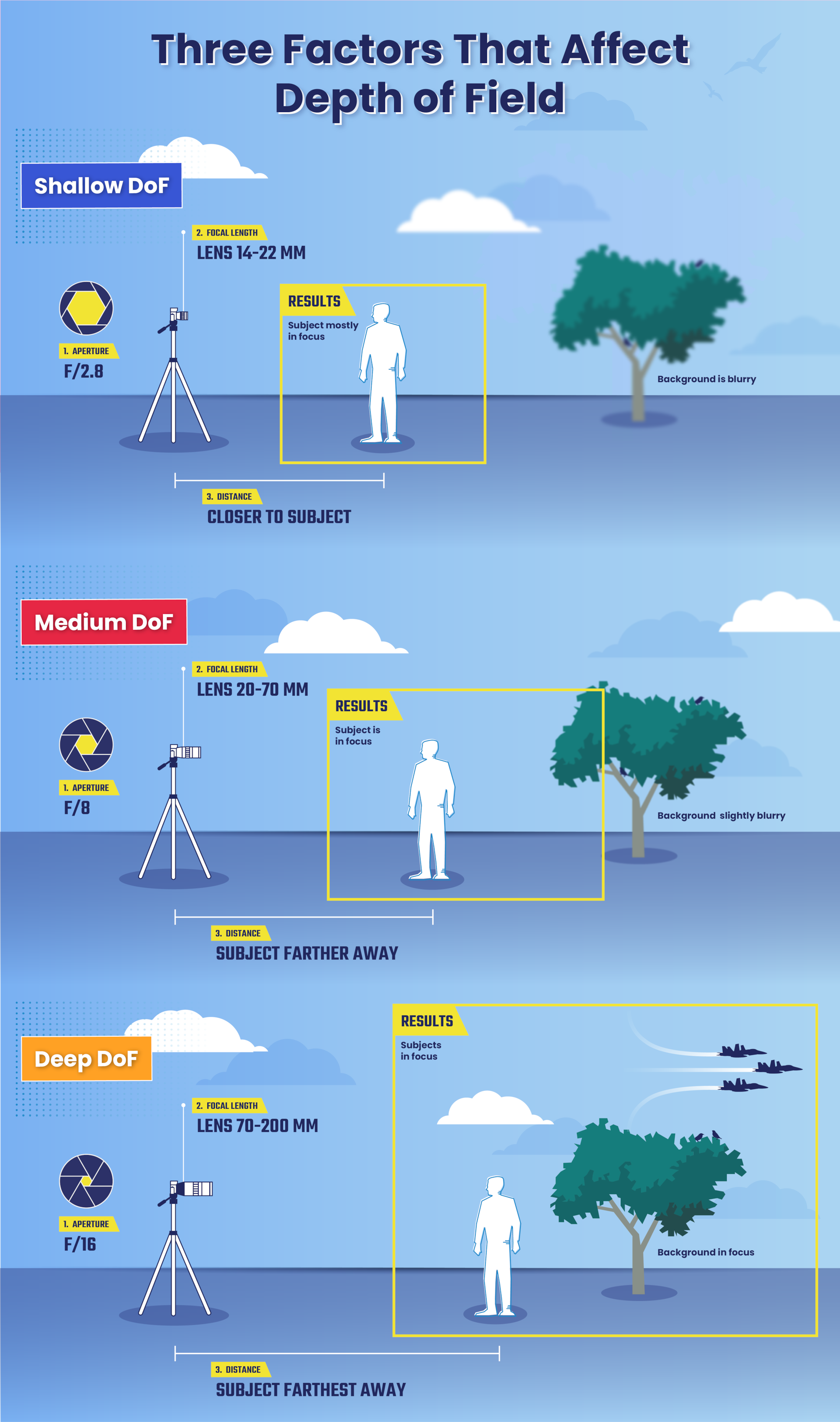
slide 6: Depth of Field (controlling sharpness in a Photograph) how Focal length affect Dof. how to set it up on the DSLR? what mode to shoot in? what's a good aperture for blurry background.
slide 6: Depth of Field (controlling sharpness in a Photograph) how Focal length affect Dof. how to set it up on the DSLR? what mode to shoot in? what's a good aperture for blurry background.
HW: write a draft story about food in general - it will be our next Photostory for MP2


